
W. W. Norton & Co.
W.W. Norton & Company is an independent publishing company, During my internship at the company, I was able to collaborate with and learn from a team of 8 designers to build digital learning products for students and instructors.
ROLE
Product Designer
TEAM
8 product designers
Problem
The pandemic has reshaped the class environment. Less students are using physical textbooks, and participation has shifted toward online discussions.
Solution
Introduce student annotations into ebook readers to facilitate student collaboration and meet market demands.
DELIVERABLES
User surveys, competitive analysis, affinity map, usability test, wireframe, prototype
DURATION
Jun - Aug 2022 (3 months)
The process
I was heavily involved in the research and discovery phases for new ebook features. In my first month, I outlined instructor ebook surveys and completed competitive analysis. Later, I conducted usability tests, analyzed UT findings, and constructed user stories. Towards the end of the program, I spearheaded design concepts for new collaboration features inside the ebook, based on our research.
Analyzing our competitors
We looked at 11 competitors from a high-level view, then organized our findings into 4 categories: social collaboration, student/instructor analytics, display settings, and accessibility.


Competitve analysis
In the social collaboration category, we compared note-sharing, peer review, group chat, and discussion board features between the competitors. Most competitors allow students to share their notes with each other. For instance, Vitalsource and Redshelf ebooks allow students to share notes by entering a group code or sending out links or email invites. Perusall and Hypothes.is, however, enable students to engage with each other through social annotations. As students read the ebook content, they can highlight the text, add a note, and comment on each other’s notes. Although Norton has not implemented this note-sharing capability yet, we plan to introduce social annotations to create a more collaborative digital learning environment.
How do students collaborate?
To look for feedback on our ebooks and recruit participants for our usability test, we created a short survey for instructors who use Norton ebook readers. Along with basic demographics about their classrooms and institutions, we asked them questions about competing products, content they’d like to add to the ebook, and collaboration inside their classes. After receiving 174 responses, here are some of the key highlights in the survey results.
-
About 50% instructors state that collaboration is considered part of a participation grade for the class.
-
44% state that their class has an online discussion board where they discuss various topics related to the reading or assignment.
-
32 % instructors state that students collaborate online through activities that they set up for them.
The survey indicate that collaboration is prevalent in class. Having some form of collaboration within the ebook can supplement students' learning and engagement with the material.
Usability testing
The purpose of the usability test was to determine if instructors understand how students would complete an assignment in our assignable ebooks. We also wanted to know if the instructor content feature was easy to use and learn more about student collaboration. We conducted 1-hour sessions with 6 participants who teach at different institutions across the nation and currently teach a course that uses a Norton Ebook. I was the moderator for 1 session, and the notetaker for 2 sessions.
The test was divided into 4 parts:
-
Interview questions on course set-up
-
Usability test on prototype - user flow of completing an assignment linked to a LMS course
-
Usability test on live ebook - user flow of publishing instructor content
-
Interview questions on collaboration

Heat map for usability test
We tested existing features in the assignable e-textbooks, like assignments and instructor content. Participants were able to navigate the e-textbooks with little to no difficulty.
Insighs on collaboration
In the final part of the usability test, we interviewed the participants about collaboration in their class. We asked them questions on student annotations, effective student collaboration methods, and peer review tools. To spot patterns and summarize our findings, we organized their responses in an affinity map.

Affinity map based on user interviews
BENEFITS OF COLLABORATION IN THE EBOOK
-
Better comprehension of material: Students can lean on each other to understand the material better.
-
Peer influence: Instructors believe that students will put more thought into their comments because they care about what their peers say.
-
Personal connection: Students can add value to the material by connecting to their backgrounds
-
Engagement tracking: Instructors can see what sections students are focus on annotating and paying attention to in the ebook
“Allows students to engage with each other and come to conclusions they may not have otherwise by experiencing a variety of thinking strategies & opinions."
CHALLENGES OF COLLABORATION IN THE EBOOK
-
Bullying: Instructors would like the option to moderate annotations to keep things civil.
-
Uneven student performance: High-performing and low-performing students may be separated.
-
Accessibility: Some students do not have access to the internet.
-
Time consumption: Instructors worry about the time it will take them to grade student annotations.
Writing user stories
After gaining a better understanding of our users’ thoughts, concerns, and methods of collaboration, we generated user stories to begin our ideation process. We collected 34 user stories, from both student and instructor experiences, and ranked them on the MoSCoW scale. For my initial design concepts, I chose to focus on the ones marked with “Must have.” These stories consist of the ability to share annotations, comment on other annotations, search through notes, edit/delete/filter notes, and learn collaborative functions easily and quickly.
Examples
-
As a student, I want to be able to share my annotations with the class, so that I can contribute thoughts and questions to class discussions and invite comments from my classmates and instructors.
-
As an instructor, I want to moderate the annotations created and shared by my students so that I can direct class discussions in constructive ways and control unacceptable behavior and so bullying doesn't occur.
Sketching design concepts
Taking the user stories into consideration, I sketched different design concepts for how student annotations could function in ebooks and presented those sketches to other designers for feedback.


Wireframe sketches
Wireframing & iterating
NOTEBOOK PANEL
-
Renaming panel labels: The original "Personal" label may imply private notes. "Personal" and "Shared with Others" panel labels were renamed to "Created by Me" and "Created by Others" to help students easily separate their own notes from classmate's notes.
ORIGINAL NOTEBOOK PANEL

NOTEBOOK PANEL V1
Created 2 tabs to separate notes authored by self and notes authored by others

Changed label names to communicate more clearly
NOTEBOOK PANEL V2 - CREATED BY OTHERS

"Created by Me" panel has public and private tags
VS
"Created by Others" panel has author name
NOTEBOOK PANEL V2 - CREATED BY ME

-
Differentiating private notes, public notes, and authors: Icon tags help distinguish type of annotation in ebook content area.
-
Exploring the possibility of “Private” vs. “Public” notebook panels: Public notes would include notes that are authored by the user and other people. Concept was scrapped because it went against a user story: As a student, I want to be able to filter my notes vs others’ notes, so I don’t get influenced or distracted by other people’s opinions when studying. It’d be helpful to research more on students’ mental models and how they typically categorize their notes.

Private vs. public note in-textbook highlight and annotation
FUNCTION 1: THREAD
-
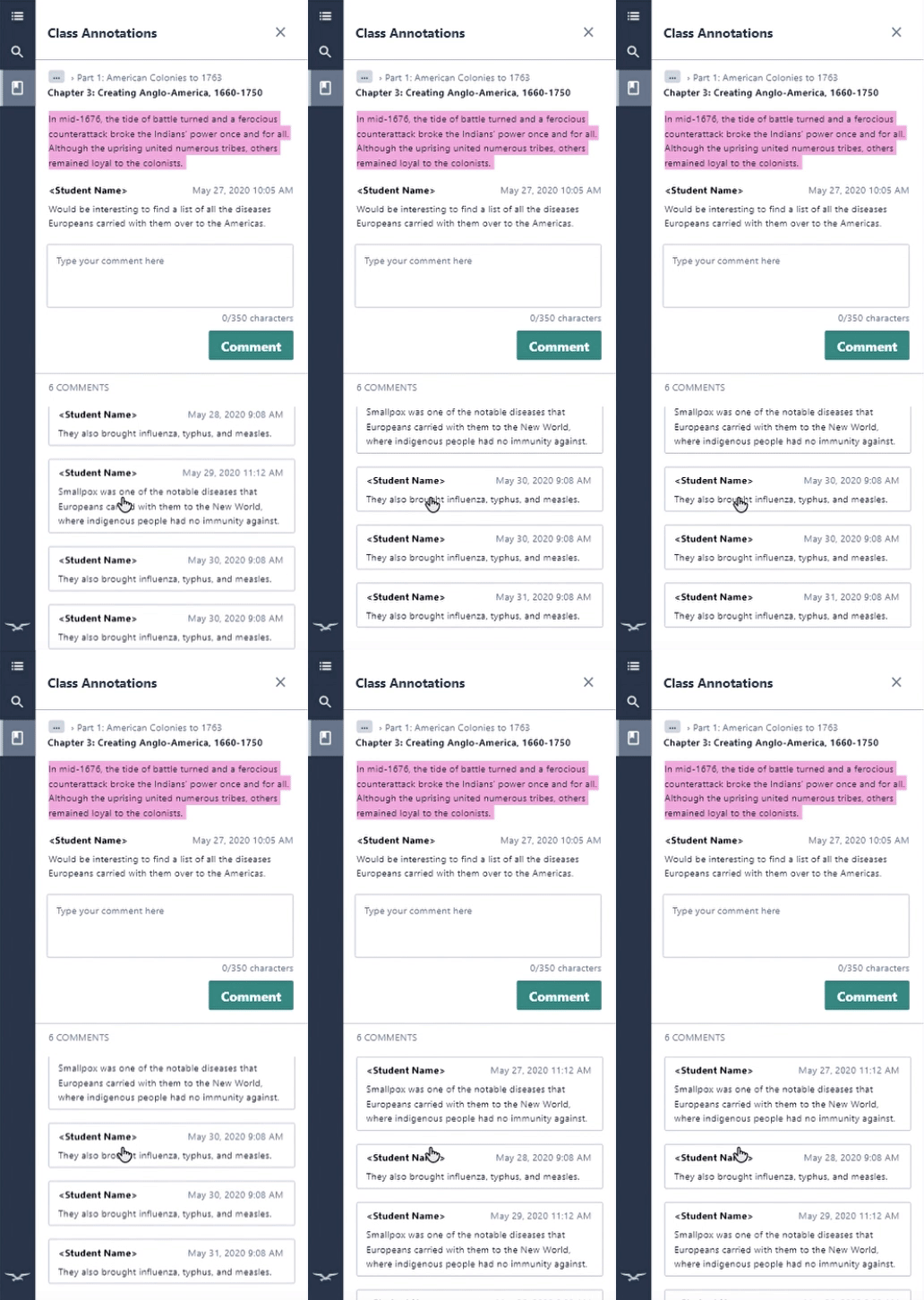
Envisioning Hypothes.is integration: The thread was re-formatted to emulate Hypothes.is, an annotation plug-in that our dev team uses for their backend. Flagging was also introduced but later removed because it wasn't priority.
-
Removing sub-commenting: One of the biggest challenges was looking into the extremes and figuring out how the thread would look with no comments or 50 comments. (How many limits are there to replies to a comment? How many times can a comment indent?) After revisiting the purpose of annotations, I removed the ability to reply to other people’s comments in the thread to move away from a chat-like social media interface and toward a more formal direction. This discourages students from going off tangent or having arguments in between annotations. Teachers are also able to scroll down the comments more easily and track who is engaging in the text, instead of needing to expand each sub-comment thread.
-
Dividing thread by static and scrolling parts: The reply box was moved to the top of the page under the highlight and annotation so that users can see the content that they are replying to. This top part remains static, while the bottom comment section is scrollable.
THREAD V1

Reformatted comments to mirror Hypothe.is + show comment order more clearly
THREAD V2

"Thread" renamed to "Class Annotations"
Static part contains highlight, annotation, and comment box
Scrolling part contains comments
Removed subcomment ability for more formality
THREAD V3
FUNCTION 2: EDITING
-
Adding sharing option: Sharing drop-down was introduced, so students can make their note private or public.
-
Removing "share with instructor only" option: Option to share with the instructor only set up unrealistic expectations for instructors to attend to those specific notes, especially since there are other communication tools between students and instructors outside the ebook reader. It also added greater complexity when designing the instructor experience by creating the need for filtering and sorting.
EDIT NOTE V1
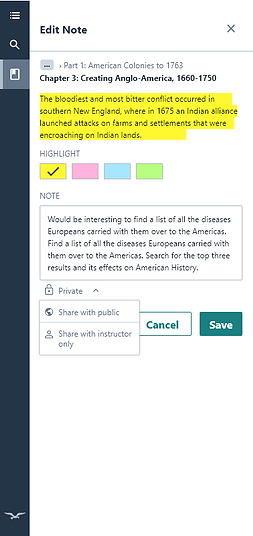
EDIT NOTE V2
Changed drop down to reflect Norton design system

EDIT NOTE V3
Removed ability to share with instructor only

Prototyping the user flow
Student user flow
In the student ebook flow, students can edit their annotations, and turn their private annotations into public annotations. They can also delete their annotations, and comment on other people’s annotations. The instructor experience has the same capabilities.
Next Steps
1
Validate design in usability test with students and instructors.
2
Research and incorporate new features after obtaining market reaction to MVP. Allow the ability for students to filter through their own highlights and notes vs. others’ in the ebook content area. Allow instructors to grade annotations.
Reflection
The biggest challenge during the research phase was being aware of time and being careful of how questions are phrased, so they don't lead or confuse the user.
The biggest challenge during the design stage was balancing everyone's feedback and solidifying design decisions. When I was stuck between 2 different designs, I would revisit the user problem to evaluate which would solve the problem best.
I also learned to keep the design simple and learn to prioritize basic functions and cut down on "nice to have" features. For example, instead of adding a feature in which students can flag other people's inappropriate comment and bring it to the teacher's attention, I chose to prioritize what deleting a post may look like and worked out that entire flow. Staying detached from my solutions was also an important lesson in order to successfully iterate designs.


👋 Hope to hear from you soon!